Guide
Accounts
How accounts work in Bluecoins — individual accounts, the Account Type each one belongs to, and the Account Group that puts it on the Assets or Liabilities side of your balance sheet.
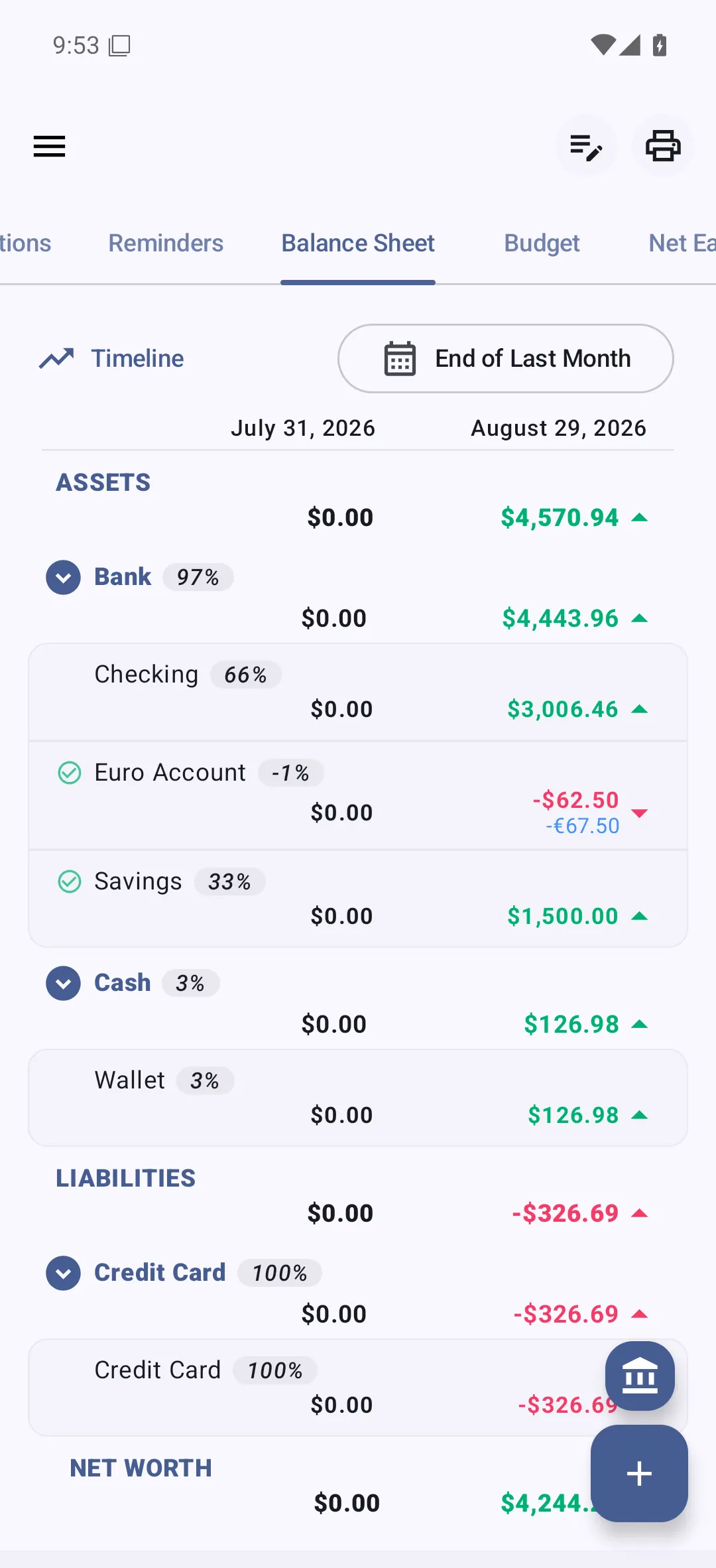
An account in Bluecoins is a place your money sits: a bank account, your wallet, a credit card, or a bucket you have set aside. Every account has an Account Type — Bank, Cash, Credit Card, and so on — and every Account Type belongs to an Account Group: Assets or Liabilities. The Account Group is what puts the account on one side of your balance sheet.
Accounts
Accounts are the backbone of Bluecoins: transactions, budgets, cash flow, and the balance sheet are all tied to them.
Each account has a name, an Account Type, a currency (with its own conversion rate, so an account can be in any world currency), and an opening balance. You can also mark an account as a favorite so it stays on the dashboard, or hide it from the pickers without deleting it.
Bluecoins creates a few accounts for you when it first sets up its database: Checking and Savings (Bank), Wallet (Cash), Credit Card (Credit Card), and House Mortgage (Mortgages). Add your own from the accounts list with Add New Account, and edit or delete them at any time.
Account Types
An account’s Account Type is the grouping above it: Bank, Cash, Investments, Credit Card, and so on. The Account Type says what kind of account it is; its Account Group then decides which side of the balance sheet it lands on.
Naming note: the Account Setup screen labels this field Account Type, and the menu that manages the types is Account Type Setup.
The Account Types below are only the defaults Bluecoins creates during setup. You can rename them, create your own, or delete the ones you do not use; an Account Type that holds your default account cannot be deleted until you choose another default account.
Account Groups
An Account Group is one of the two sides of your balance sheet, and every Account Type belongs to exactly one:
- Assets — things you own: bank and cash accounts, investments, money owed to you, property, and so on.
- Liabilities — things you owe: credit cards, loans, mortgages, and bills still to pay.
Your net worth is Assets minus Liabilities. Because a transfer only moves money between your own accounts, it never changes your net worth; the balance sheet guide shows how the groups roll up into assets, liabilities, and net worth.
Asset Account Types
- Bank — a checking or savings account at a bank. No special behaviour; it is treated like any other asset account. The default Checking and Savings accounts use this type.
- Cash — physical money you hold, including a wallet. No special behaviour. The default Wallet account uses this type.
- Investments — money held in investments, such as stocks or funds. No special behaviour.
- Receivables — money that is owed to you. No special behaviour.
- Properties — property you own, such as real estate. No special behaviour.
- Other Assets — anything you own that does not fit one of the other asset types. No special behaviour.
- Foreign Assets — an asset you hold in a currency other than your default one. No special behaviour; any account can use any currency, so this type is a label rather than a mechanism. See the multi-currency guide.
- CryptoCurrencies — a cryptocurrency holding. This is the one asset type with special behaviour: amounts on a crypto account are shown with full precision (six decimal places, without currency grouping), because crypto units are fractional.
- Virtual Accounts — a bucket for money that has no real account of its own, such as a wallet, cash you hold, or money set aside. It has no behaviour of its own — the app treats it like any other asset account — and it is not a way to put one account inside another: Bluecoins has no parent/child relationship between accounts, so a balance cannot sit in a real account and a virtual one at the same time. A transfer moves the money out of the source account, so after the transfer it is in one place, not both.
Liability Account Types
- Credit Card — a credit card you owe on. This type has special behaviour: statement cycles with a cutoff day and a due day, a credit limit, not-billed purchases, installment plans, a statement report, and due-date reminders. See the credit cards guide.
- Loans — money you owe as a loan. No special behaviour: the account tracks a balance only, and the app does not calculate interest or amortization schedules for you. See the debts and loans guide.
- Mortgages — a mortgage on a property. No special behaviour beyond the balance it tracks. The default House Mortgage account uses this type.
- Payables — money you owe to someone else, such as an unpaid bill. No special behaviour.
- Other Liabilities — anything you owe that does not fit one of the other liability types. No special behaviour.
- Foreign Liabilities — a liability in a currency other than your default one. No special behaviour.
The “No Account” type
Bluecoins also has a system type called No Account. It is not a real place to hold money: it sits outside the two Account Groups (it belongs to neither Assets nor Liabilities) and is used for money that has not been assigned to any account. It does not appear in the Account Type picker when you create an account.